
Back to: Block Programming
What is Programming?
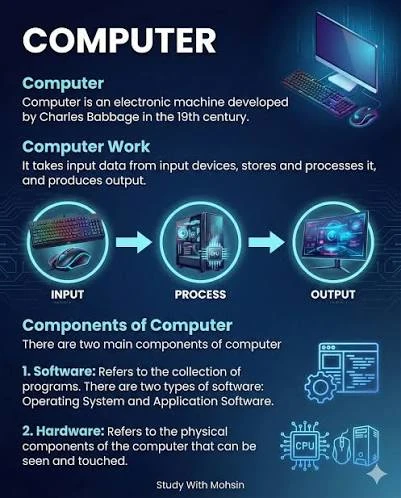
Every computer program operates fundamentally on a core cycle of Input, Processing, and Output (IPO). It receives data, manipulates or calculates it using specific instructions, and delivers a result.
The Core Cycle (IPO)
- Input: The program gathers data from the user (via keyboard/mouse), files, or sensors.
- Processing: It performs arithmetic, logical comparisons, and data manipulation.
- Output: The program presents the processed information to the screen, a printer, or saves it to storage
Fundamental Programming Constructs
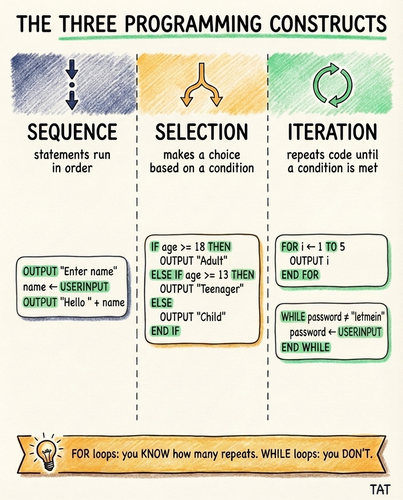
At the code level, all software is built by combining three basic control structures, along with functions and data storage.
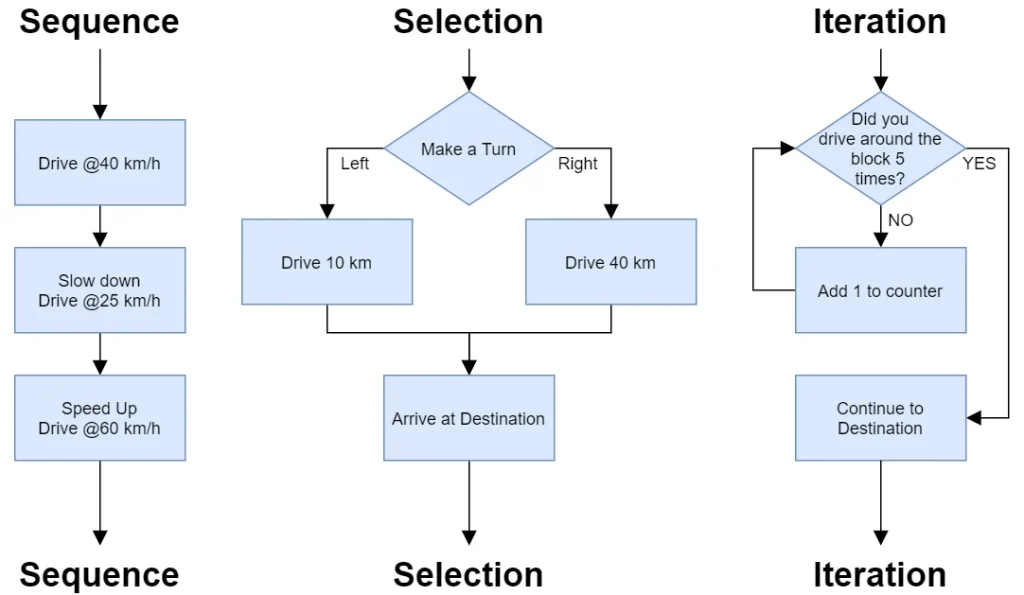
- Sequence: Code runs top-to-bottom, executing instructions exactly in the order they are written.
- Selection / Conditionals: The program makes decisions and changes its execution path based on whether specific conditions are met (e.g.,
if / elsestatements). - Iteration / Repetition: The program repeats a block of code until a certain condition is satisfied (e.g.,
forandwhileloops). - Variables & Data Structures: Temporary storage for holding data (e.g., numbers, text, arrays) while the program is running.
- Functions & Procedures: Reusable blocks of code designed to perform specific tasks, keeping the program modular.
Variables
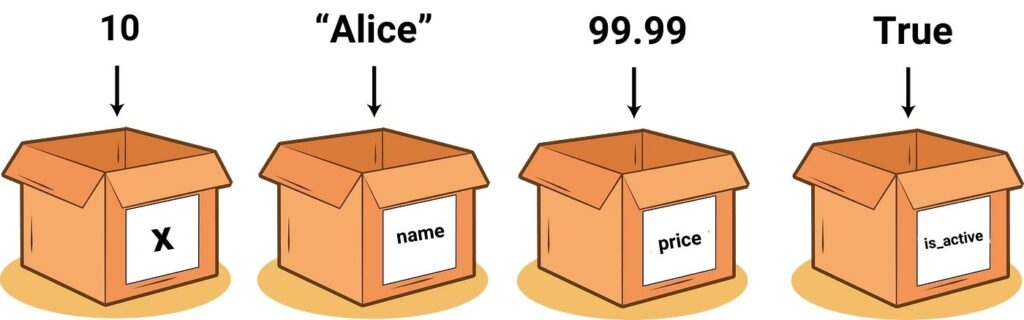
A variable is a named container that can store data or information. It could be an Integer, a decimal or fraction, it could be a word or sentence or True or False.
Before you write any code – you need a plan
Before writing a single line of computer code, jumping straight into an Integrated Development Environment (IDE) is a recipe for messy, broken software. Professional software development relies heavily on upfront planning to save time, reduce cognitive load, and prevent architectural mistakes.
You don’t just sit down and write a game, you must first plan out what the game will do, how it’s scored, who is using it, what it will run on, an so on.
The essential steps to complete before writing code include the following:
Define the Problem and Requirements
- Identify the core issue: Clearly state what problem the software solves and why it is necessary.
- Determine the audience: Profile the end-users to understand their technical skill levels and specific needs.
- List constraints: Document the target operating systems, hardware limitations, and performance expectations.
Design the System Architecture
- Select the tech stack: Choose the most effective programming languages, frameworks, and database types for the project.
- Model the data: Map out database schemas, entity relationships, and data storage structures.
- Map out data flow: Diagram how information moves between the user interface, backend servers, and external APIs.
Build the Logic and Algorithms
- Break tasks down: Split broad project features into microscopic, manageable programming tasks or components.
- Draft pseudocode: Write out the logical steps of complex functions in plain language before translating them into actual programming syntax.
- Create flowcharts: Use visual diagrams with standard symbols to map execution paths, decision forks, and loops.
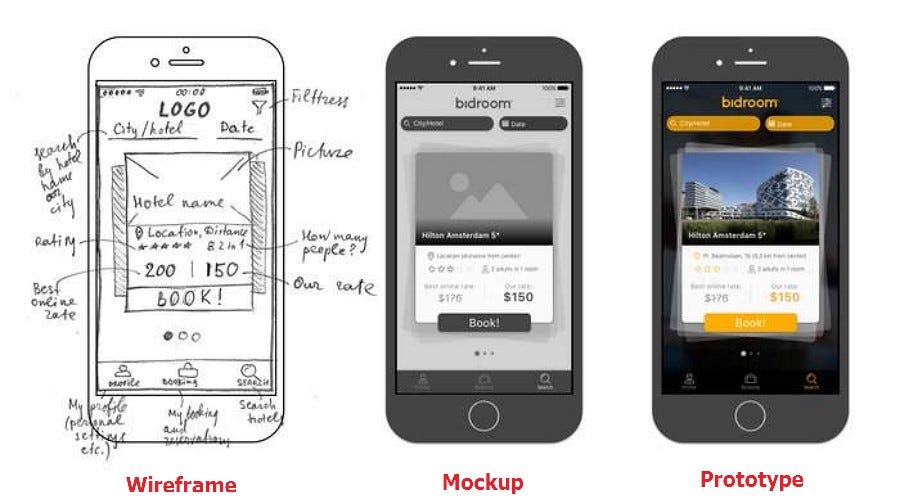
Create UI/UX Mockups
- Sketch the screens: Draw basic low-fidelity wireframes to plan user interfaces and visual layouts.
- Define navigation: Establish exactly how users will click or transition from one view to another.
Establish the Environment and Guidelines
- Configure version control: Initialize a Git repository to securely track code history and enable seamless collaboration.
- Set coding standards: Agree on specific naming conventions, formatting style guides, and testing rules.
- Write test cases: Draft the expected inputs and outputs for features ahead of time if following a Test-Driven Development (TDD) approach.
Let’s go through the process
Write the following as a computer program:
Create a simple number guessing game where the program selects a random number (between 1 and 100). The player continues to make guesses and is notified if each guess is too low or too high. A counter keeps track of the number of guesses and the game ends when the correct number is guessed, finally the number of tries will be displayed.
Complete planning blueprint
1. Requirements Definition
Before coding, you must define exactly what the program will do.
- Goal: Create a game where a player guesses a hidden random number.
- Inputs: The player types a numeric guess via the keyboard.
- Outputs: Text feedback (“Too high”, “Too low”, or “Correct!”) and the final guess count.
- State tracking: The program must store the secret number and the current number of attempts.
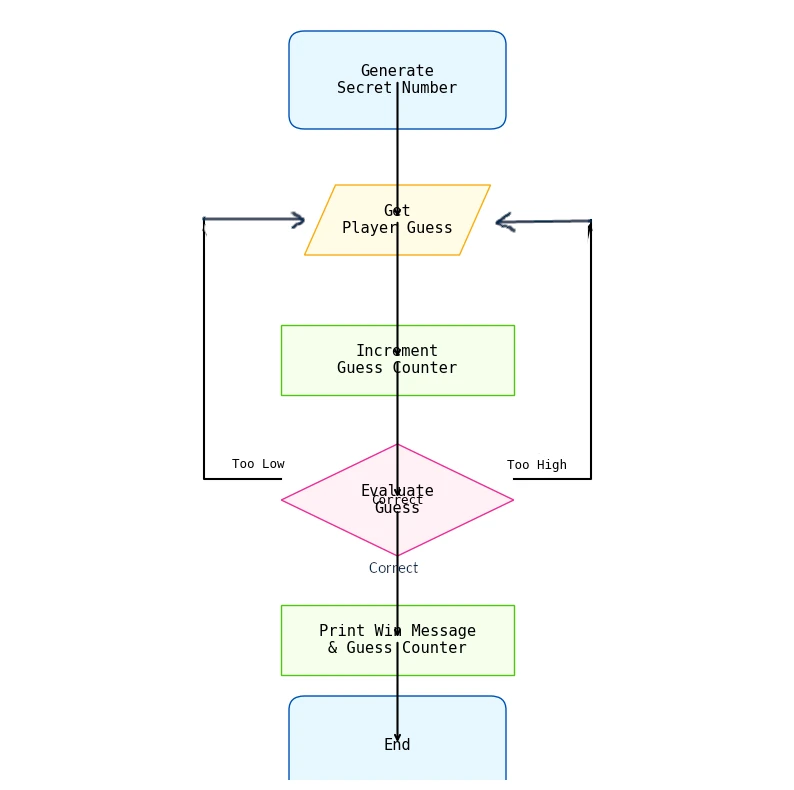
2. Logic & Algorithm Design (Flowchart)
Visualising the logic prevents endless loops and broken conditions. Show your students how the game flows from start to finish:
3. Pseudocode Plan
Pseudocode helps programmers focus on logic without worrying about missing semicolons or syntax errors. Some programmers like to write this out first:
SET secret_number TO random number between 1 and 100
SET guess_counter TO 0
SET player_guessed_correctly TO False

PRINT "Welcome to the Number Guessing Game!"

WHILE player_guessed_correctly IS False:
    GET player_guess from input
    ADD 1 to guess_counter

    IF player_guess EQUALS secret_number THEN
        SET player_guessed_correctly TO True
    ELSE IF player_guess IS LESS THAN secret_number THEN
        PRINT "Too low! Try again."
    ELSE
        PRINT "Too high! Try again."
    ENDIF
ENDWHILE

PRINT "Correct! It took you " + guess_counter + " tries."
4. Data & Variables Table (Data Dictionary)
Programmers need to identify what information their program must “remember” while running.
| Variable Name | Data Type | Purpose | Initial Value |
|---|---|---|---|
secret_number | Integer | The target number the player needs to guess | Random (e.g., 1–100) |
player_guess | Integer | The current number entered by the user | None / Null |
guess_counter | Integer | Tracks how many times the player has guessed | 0 |
player_guessed_correctly | Boolean | Controls whether the game loop keeps running | False |
Choose a programming language
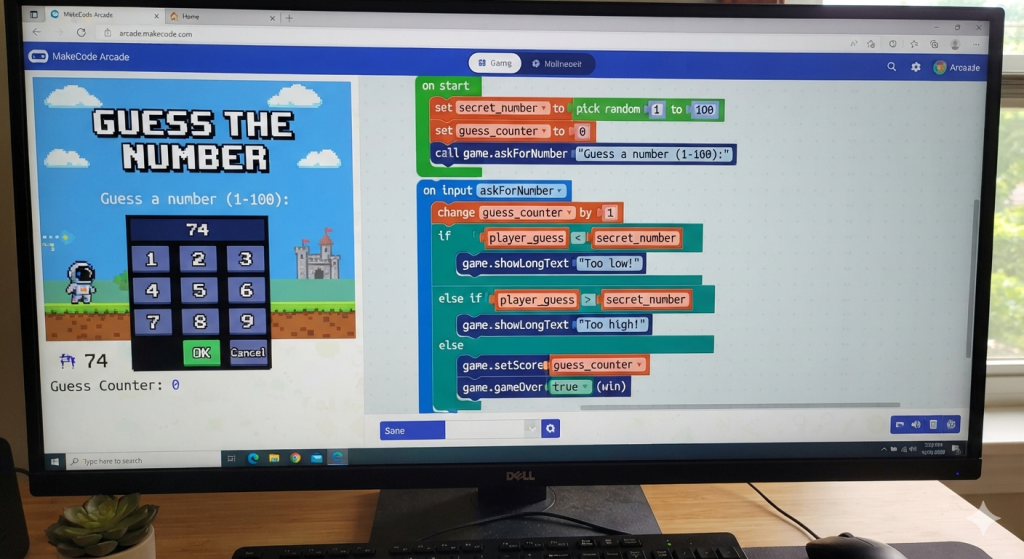
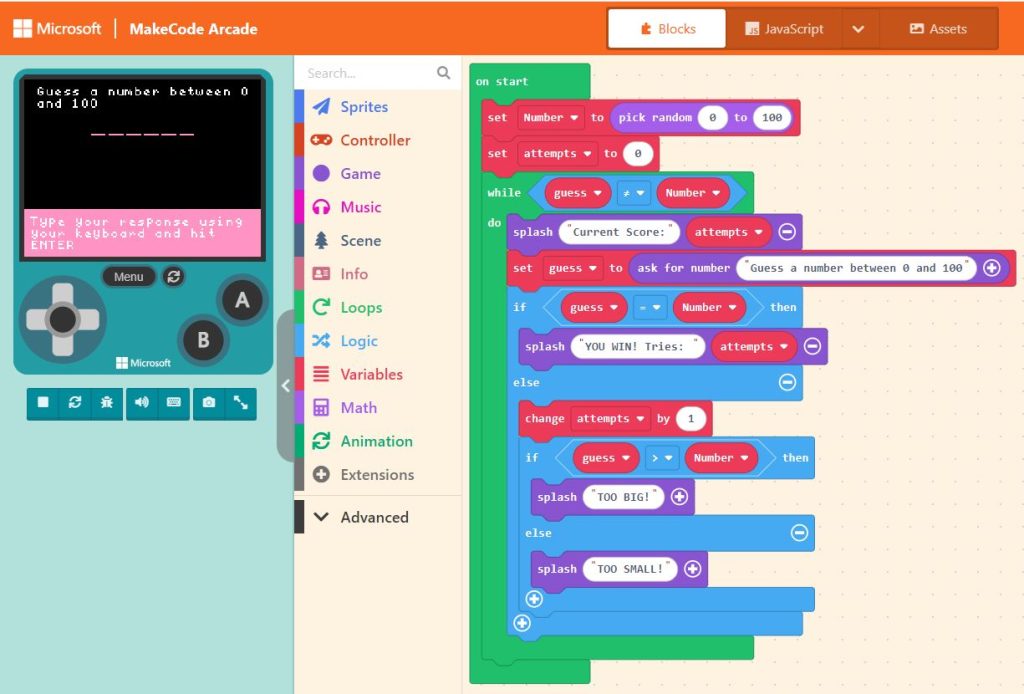
Now that we’ve planned the project, it’s time to write some code. We could use Blockly, Scratch or MakeCode Arcade if we want a block based program, or we could use any one of the hundreds of programming languages available.
At Norwood Secondary College we have selected Python as our VCE Object Oriented Computer Programming Language of choice, but there are many other options such as PHP, Visual Basic, C, C++, JavaScript,
Using Microsoft MakeCode Arcade
Using Python
import random
player_guess = 0
guess_counter = 0
secret_number = 0

# On Start
secret_number = random.randint(1, 100)
guess_counter = 0

# Game Loop logic
while player_guess != secret_number:
    player_guess = int(input("Guess a number (1-100):"))
    guess_counter += 1

    if player_guess < secret_number:
        print("Too low!")
    elif player_guess > secret_number:
        print("Too high!")

# Game Over Win Screen
print(f"Congratulations!! It only took you {guess_counter} guesses.")
Gameplay:
Guess a number (1-100):50
Too low!
Guess a number (1-100):75
Too high!
Guess a number (1-100):60
Too high!
Guess a number (1-100):55
Too low!
Guess a number (1-100):58
Too high!
Guess a number (1-100):56
Too low!
Guess a number (1-100):57
Congratulations!! It only took you 7 guesses.