
Back to: Spreadsheets – Excel
Question 1
Working with Formulae – telephone call statistics
On a new workbook, type in the text and numbers in the same cells as shown below:
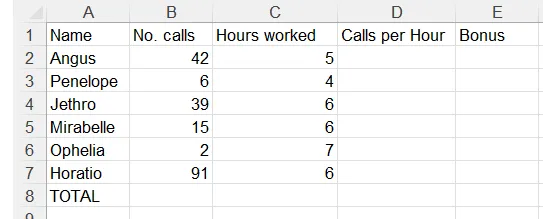
In cell D2 create a formula using the following information:
- Calls per hour = No. calls / Hours worked
Copy the formula down the column to work out the other calls per hour.
In cell E2 create a formula using the following information:
- Bonus = Calls per Hour * 1.75
Copy the formula down the column to work out the other bonuses.
In cell B8 create a formula that will add together all the numbers of calls.
Copy the total formula across the row to calculate the other column totals.
Save the file with the name: telephone_call_stats.xlsx
Question 2
Working with Formulae – Office costs for first quarter of year
On a new workbook type in the text and numbers in the same cells as shown below:

In cell B4 create a formula using the following information:
- Services costs per month = annum cost of 12750 / 12 (ie. divided by 12)
Copy the formula across to cells C4 and D4 to work out the other monthly services costs..
In cell B6 create a formula using the following information:
- Advertising = 1.75% of staff costs for that month (ie. 1.75% * staff costs in cell B3)
Copy the formula across to cells C6 and D6 to work out the other advertising costs.
In cell E2, create a formula that will add together all the monthly admin costs.
Copy the total formula down the column to calculate the other quarterly totals.
In cell B7 create a formula to add the total costs for January, then copy this across to calculate the other column totals.
Save the file with the name: qtr1_office_costs.xlsx
Question 3
Using IF to calculate different voucher rates
In a fundraiser, Norwood Club members can receive drink vouchers based on how much they collect. An incentive to get members to collect at least $95 means they get a voucher for every $4 collected if they make OVER $95. If not they get a voucher for every $10 collected. Use a conditional formula to calculate the correct number of vouchers given for the amounts shown.
On a new workbook type in the text and numbers in the same cells as shown below:

In cell C4 create an =IF function to calculate the number of club card vouchers earned. Use the following information to help you:
- If the amount is greater than $95, you get 1 voucher per $4 spent
- Anything less you only get 1 voucher for every $10 spent
Don’t forget to set up range names for the input cells containing the high and low voucher amounts and the voucher threshold figures.
Don’t forget – TRUNC removes the fractional part of the number. INT rounds numbers down to the nearest integer based on the value of the fractional part of the number.
Copy your =IF function down the column to calculate the other club card vouchers earned.
Change the rates for the high and low vouchers and the threshold as shown below:
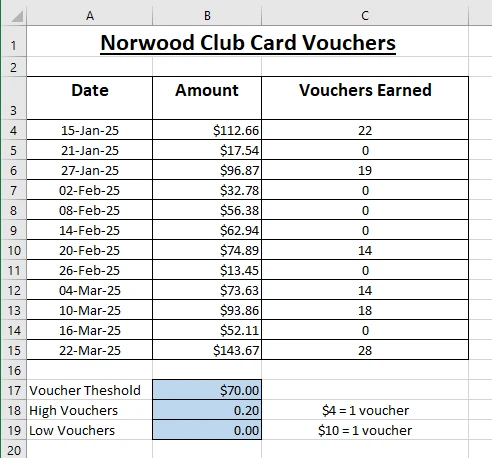
Save the file with the name: norwood_club_vouchers.xlsx
Question 4
Conditional formatting
On a new workbook type in the text and numbers in the same cells as shown below: (click this image for a better look)

Use formulae for columns G, M, N, O and R to calculate the total share cost price, total share sale price, profit by % and $.
In the profit column, use conditional formatting to display a loss in RED and a gain in GREEN.
Finally, the strong buy column is a level that indicates the share is good value, if the price fall below this value, use a conditional formula to provide an alert reminding you that this share is in your buy zone.
Save the file with the name: share_price_watchlist.xlsx