
Back to: Python Programming
The Python Programming Language
Python is a high-level, general-purpose programming language known for its readability, simplicity, and versatility. Key characteristics:
- Readability:
- Python emphasizes clean, readable code with a simple and straightforward syntax, reducing the cost of program maintenance and development.
- Interpreted and Interactive:
- Python is an interpreted language. Code can be executed line by line, making it suitable for prototyping and testing.
- High-Level Language:
- Python abstracts low-level details, providing a high-level programming environment. This allows developers to focus on solving problems without dealing with memory management or other low-level complexities.
- Extensive Standard Library:
- Python comes with a rich set of libraries and modules, known as the Standard Library, covering areas such as file I/O, networking, web development, databases, and more.
- Object-Oriented Programming (OOP):
- Python supports object-oriented programming principles, allowing developers to structure code using classes and objects. Encapsulation, inheritance, and polymorphism are integral to Python’s OOP paradigm.
- Web Development:
- Python is widely used for web development, with frameworks like Django and Flask providing efficient tools for building scalable web applications.
- Data Science and Machine Learning:
- Python is a popular choice for data science and machine learning projects. Libraries like NumPy, pandas, scikit-learn, and TensorFlow make it a powerful tool for data analysis, modeling, and deep learning.
Overall, Python’s simplicity, readability, extensive library support, and diverse applications make it a popular choice for beginners and experienced developers.
Getting Started: Python or Anaconda
Download “Python” for your OS from https://www.python.org/downloads/
Install on your computer.
Integrated Development Environment (IDE)
An Integrated Development Environment (IDE) for Python is a software application that provides comprehensive tools and features to facilitate the development, debugging, and deployment of Python applications. The primary functions of a Python IDE include:
- Code Editor:
- Syntax Highlighting: Highlights different elements of the code with different colours, making it easier to read and understand.
- Code Execution:
- Run and Debugging: Allows you to execute and debug Python code directly from the IDE, providing features like breakpoints, step-through execution, and variable inspection.
- Interactive Console:
- Python Shell: Offers an interactive Python shell within the IDE, enabling you to experiment with code snippets and test ideas.
- Error Checking:
- Real-time Error Highlighting: Identifies syntax errors and other issues in your code as you type, helping you catch mistakes early.
Popular Python IDEs include PyCharm, Visual Studio Code (VS Code), Jupyter Notebooks, Spyder, PyScripter, PyDev, Atom and IDLE. Each IDE has its strengths and is suitable for different types of projects and workflows.
Personally, I prefer PyCharm or VS Code – but you can use any IDE that you prefer. VS Code works with other programming languages, PyCharm only works with Python.
VS Code vs PyCharm: The IDE Wars
PyCharm
You may prefer to use the free Community Edition of PyCharm which can be obtained at https://jetbrains.com/pycharm
Click the “Download” button –> Other Versions
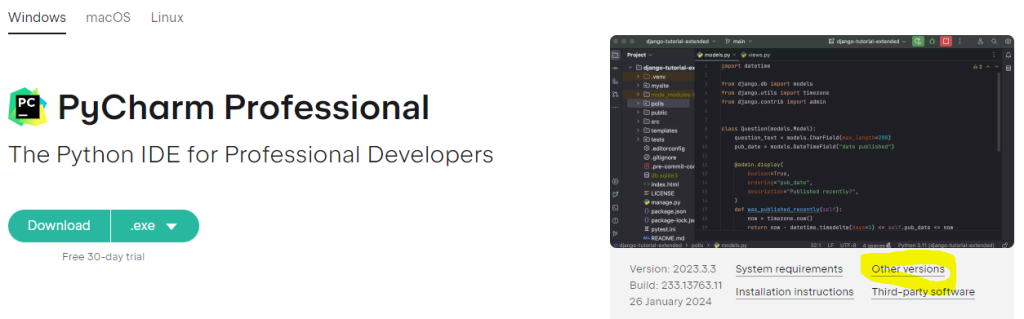
Download and Install “PyCharm Community Edition” for your OS (Windows, macOS or Linux).
VS Code
You may prefer to use the free VS Code which can be obtained at https://code.visualstudio.com/
Click the “Download for Windows” button or “other platforms” if you use Mac or Linux.

After downloading the installation file VSCodeUserSetup-x64-1.98.2.exe (around 100Mb) you can double click to install – you can pretty much stick to the default settings, one choice you might like is the “desktop Icon”:

Once installation is complete you should customise VS Code to look the way you like it. You can now integrate Microsoft’s Copilot by signing in, set a theme (Dark or Light background) – I’m choosing Dark Modern.
The next step is to “Browse Language Extensions” – click this to add support for the programming language you are going to use. Keep in mind that the main advantage of VS Code is that it can be used as an IDE for Python, C/C++, PHP, HTML/CSS, Go, Dart, C#, Ruby and, of course, Microsoft’s own Visual Basic, and others.
We need to install Python language support:

VS Code lets you choose the path to your python files – Create a folder called “PythonProjects” (or similar) on your computer in a location you will remember – you can use the Documents folder or put it on your C:\ drive.
VS Code now wants you to make a Python File in the new PythonProjects folder – type print('Hello World') into the IDE and save it as main.py. Your IDE should now look like this:

You execute (or run) the program by clicking the “Run” icon:

The output appears in a terminal window underneath the code, but it looks cluttered due to all of the path information that sits above and below the output. We can address this by adjusting some colour settings:

The following YouTube clip details how we can de-clutter VS Code to make the output look better.
Python Learning Roadmap for Beginners – (6m 47s)