Back to: Python Programming
Say Hello to PyScript
PyScript is an open source platform for Python in the browser.
PyScript brings together two of the most vibrant technical ecosystems on the planet. If the web and Python had a baby, you’d get PyScript.
At the core of PyScript is a philosophy of digital empowerment. The web is the world’s most ubiquitous computing platform, mature and familiar to billions of people. Python is one of the world’s most popular programming languages.
With PyScript, Python runs anywhere there’s a browser (which is everywhere).
PyScript is…
- Easy: your apps run in the browser with no complicated installation required.
- Expressive: create apps with a powerful, popular and easy to learn language like Python.
- Scalable: no need for expensive infrastructure ~ your code runs in your user’s browser.
- Shareable: applications are just a URL on the web. That’s it!
- Universal: your code runs anywhere a browser runs… which is everywhere!
- Secure: PyScript runs in the world’s most battle-tested computing platform, the browser!
- Powerful: the best of the web and Python, together at last.
Example
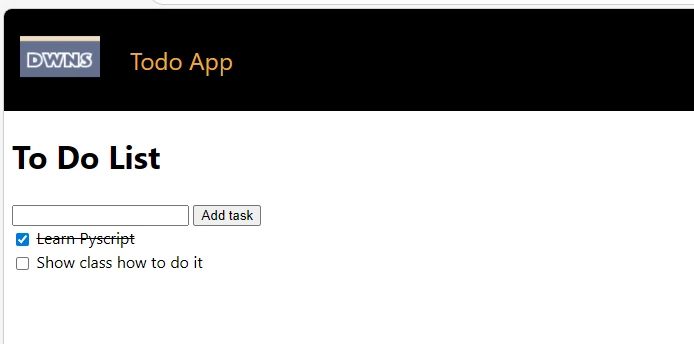
To work with PyScript, you’ll need to have some experience with HTML, CSS and Python. The following example has 6 elements to make it work. An index.html file to run in the browser, a style.css file for styling, a main.py file containing the python code, a pyscript.toml file with a description of the Python environment in which the application will run, and a couple of images (a logo and a favicon).
index.html
<!doctype html>

<html>
    <head>
        <!-- Recommended meta tags -->
        <meta charset="UTF-8">
        <meta name="viewport" content="width=device-width,initial-scale=1.0">

        <!-- PyScript CSS -->
        <link rel="stylesheet" href="https://pyscript.net/releases/2025.8.1/core.css">
        <!-- CSS for examples -->
        <link rel="stylesheet" href="css/style.css" />

        <!-- This script tag bootstraps PyScript -->
        <script type="module" src="https://pyscript.net/releases/2025.8.1/core.js"></script>

        <!-- for splashscreen -->
        <style>
            #loading { outline: none; border: none; background: transparent }
        </style>
        <script type="module">
            const loading = document.getElementById('loading');
            addEventListener('mpy:ready', () => loading.close());
            loading.showModal();
        </script>

        <title>Todo App</title>
        <link rel="icon" type="image/png" href="favicon.png" />

        <style>
            .line-through {
                text-decoration: line-through;
            }
        </style>
    </head>

    <body>
        <dialog id="loading">
            <h1>Loading...</h1>
        </dialog>

        <nav class="navbar" style="background-color: #000000">
            <div class="app-header">
                <a href="/">
                    <img src="dwns_logo.webp" class="logo" />
                </a>
                <a class="title" href="" style="color: #f0ab3c">Todo App</a>
            </div>
        </nav>

        <section class="pyscript">
            <main>
                <section>
                    <div>
                        <h1>To Do List</h1>
                    </div>
                    <div>
                        <input id="new-task-content" type="text" />
                        <button id="new-task-btn" type="submit">
                            Add task
                        </button>
                    </div>

                    <div id="list-tasks-container"></div>

                    <template id="task-template">
                        <section class="task py-li-element">
                            <label class="flex items-center p-2">
                                <input style="vertical-align: middle;" type="checkbox" />
                                <p style="display: inline;"></p>
                            </label>
                        </section>
                    </template>
                </section>
            </main>

            <script type="mpy" src="./main.py" config="./pyscript.toml"></script>
        </section>
    </body>
</html>
main.py
from pyscript import document
from pyscript.web import page, when

tasks = []

# define the task template that will be use to render new templates to the page
# Note: We use JS element here because pyscript.web doesn't fully support
#       template elements now
task_template = page["#task-template"][0].content.querySelector(".task")

task_list, = page["#list-tasks-container"]
new_task_content, = page["#new-task-content"]


@when("click", "#new-task-btn")
def add_task(e):
    # ignore empty task
    if not new_task_content.value:
        return None

    # create task
    task_id = f"task-{len(tasks)}"
    task = {
        "id": task_id,
        "content": new_task_content.value,
        "done": False,
    }

    tasks.append(task)

    # add the task element to the page as new node in the list by cloning from a
    # template
    task_html = task_template.cloneNode(True)
    task_html.id = task_id

    task_html_check = task_html.querySelector("input")
    task_html_content = task_html.querySelector("p")
    task_html_content.textContent = task["content"]
    task_list.append(task_html)

    def check_task(evt=None):
        task["done"] = not task["done"]
        task_html_content.classList.toggle("line-through", task["done"])

    new_task_content.value = ""
    task_html_check.onclick = check_task


def add_task_event(e):
    if e.key == "Enter":
        add_task(e)


new_task_content.onkeypress = add_task_event
style.css
body {
    margin: 0;
}

.pyscript {
    margin: 0.5rem;
}

html {
    font-family:
        ui-sans-serif,
        system-ui,
        arial";
    line-height: 1.5;
}

nav {
    position: sticky;
    width: 100%;
    top: 0;
    left: 0;
    z-index: 9999;
}

.logo {
    padding-right: 30px;
    font-size: 28px;
    height: 80px;
    max-width: inherit;
}

.title {
    text-decoration: none;
    text-decoration-line: none;
    text-decoration-style: initial;
    text-decoration-color: initial;
    font-weight: 400;
    font-size: 1.5em;
    line-height: 2em;
    white-space: nowrap;
}

.app-header {
    display: flex;
    align-items: center;
    padding: 0.5rem 1rem;
}
Output: